AI Background Removal: From Hours of Masking to Seconds of Output
Background removal is one of those tasks that quietly determines whether a project ships on time. A clean cutout takes a skilled retoucher fifteen to twenty minutes per image. A bad cutout — visible edges, halo artifacts, missing strands of hair — looks unprofessional in a way that no amount of compositing can hide. For years, this was the unavoidable cost of working with photographic subjects, and the math broke down completely once a project required more than ten or twelve images.
AI background removal has reset that math. DVDFab Store produces a transparent PNG in under two seconds with edge quality that matches what a careful retoucher produces in twenty minutes. The implications run from solo creators to enterprise marketing teams, but the underlying technology — and how to use it well — is worth understanding before you trust it with production work.
What Makes a Good Cutout Different from a Bad One
The output quality of background removal tools varies enormously, and the gap is not always obvious in the preview thumbnail. Three specific factors determine whether a cutout will hold up in a real composite.
Subpixel edge precision. A strand of hair against a contrasting background is not a binary on-or-off mask. Each pixel along the boundary belongs partially to the strand and partially to whatever is behind it. A model that outputs genuine partial transparency — fractional alpha values — produces hair that looks natural against any new background. A model that uses a binary mask or a simple feather effect produces hair that immediately announces the cutout was machine-made.
Color contamination handling. Light bouncing off the background spills onto the subject's edges. Light hair photographed against a white wall picks up a fringe of background color in the few pixels nearest the edge. Quality processing identifies and corrects this contamination, leaving an edge that drops cleanly onto a different colored background. Lower-quality tools leave the contamination in place, and the subject visibly carries a halo of the original backdrop.
Semantic understanding. Edge detection alone produces unreliable cutouts. Modern segmentation models actually understand what they are looking at — a person, a product, a piece of furniture — and treat each as a foreground subject regardless of how cluttered the background gets. This is what allows DVDFab Store to handle a photograph taken in a real-world environment as cleanly as one taken in a controlled studio.
How DVDFab Store's Model Works
Each pixel in the input image is assigned an alpha value between 0 (fully transparent) and 255 (fully opaque). The model is a transformer-based vision network trained on tens of millions of segmented images, and the output is encoded directly in the alpha channel of a PNG. When you open the resulting PNG in any design tool, browser, or e-commerce platform, the transparency is preserved automatically.
Two areas where the work gets harder than the basic case:
Fine-detail boundaries. Hair, fur, feathers, lace, and similar high-frequency edge content require thousands of partial-transparency decisions. DVDFab Store includes a dedicated refinement pass for these regions — a separate, slower pass that processes only the fine-detail edge pixels at higher precision. Most cutout tools either skip this entirely or run a generic blur, both of which destroy strand-level detail.
Translucent objects. Eyeglasses, thin fabrics, glass containers, smoke, and water are partially transparent by physical design. They require correct fractional alpha values that match their natural opacity, not a binary inclusion or exclusion. This is the hardest problem in the field and the one where a five-second visual check before downloading is most valuable.
Use Cases Where AI Cutouts Change the Math
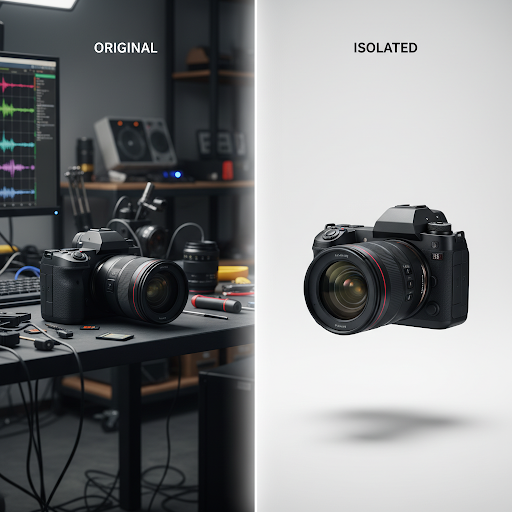
E-commerce product photography. Major marketplaces enforce a clean white background — Amazon requires at least 85% frame coverage by the product, and Shopify, Etsy, and Walmart all strongly prefer it. For one or two products, manual masking is fine. At fifty SKUs, it becomes the bottleneck that holds up an entire seasonal launch. AI processes the catalog in minutes with consistent edge treatment across every image.
Professional headshots and team photos. A photograph taken in an imperfect location becomes a polished LinkedIn or company-directory portrait the moment the background is replaced with a controlled neutral gradient. The subject is identical; the impression is completely different. For corporate teams shooting headshots in a single day, batch processing ensures every employee photo carries the same backdrop treatment.
Marketing campaign assets. Art directors need cleanly isolated subjects to composite into brand environments. The cutout quality determines whether the final piece reads as a single composed image or as a stack of separately-shot elements. Clean edges are invisible to viewers; bad ones break the illusion the moment you look at them.
Editorial and publishing. Magazine layouts, book covers, and editorial illustrations all benefit from subjects isolated against custom backgrounds. The AI handles this in seconds for in-house design teams that previously had to outsource the masking work or schedule it days in advance.
Social content and short-form video. Branded story templates, reels, and event invitations all start with an isolated subject. The faster the cutout, the faster the content ships, which matters when social runs on a daily or hourly cadence.
Real estate and architectural photography. Vacant rooms photographed for listings, then digitally staged with isolated furniture cutouts. Architectural composites layering trees, sky elements, and figures into renderings. Both workflows depend on clean isolated assets at scale.
Step-by-Step: A Single Cutout
Step 1 — Upload. Open DVDFab Store's tools page and select the background removal tool. Drop your image into the upload area or use the file picker. JPEG, PNG, HEIC (iPhone native), and WebP all work as inputs.
Step 2 — Wait two seconds. The model processes the image and returns a transparent cutout in the editor.
Step 3 — Review against the alpha grid. The cutout is displayed against a checkerboard pattern showing transparency. Look at hair edges, shoulder transitions, and any semi-transparent elements. This step takes five seconds and prevents discovering an edge problem after the file is already in a layout.
Step 4 — Run Refine Edges if needed. For portraits with detailed hair, fur subjects, or any image with high-frequency edge detail, toggle Refine Edges. A second precision pass meaningfully improves strand-level output and adds about one second to processing time.
Step 5 — Choose your output. Transparent PNG (most flexible), white background JPEG (e-commerce-ready), or a custom hex color background. The output resolution always matches input resolution.
Step 6 — Decide on shadow. Toggle Keep Shadow if you want the subject's natural ground shadow preserved in the output file at reduced opacity. This produces a more natural-looking subject when placed onto a new background and is particularly useful for product photography.
Step 7 — Download. The file is ready for any design application, marketplace listing, or social platform.
For batches — a complete product catalog, a full headshot session, or a campaign asset library — DVDFab Store AI Pro processes multiple files in parallel with consistent settings, ensuring uniform edge treatment across the entire batch.
Getting the Best Results
A few practices substantially improve output quality.
Upload at the highest resolution you have. DVDFab Store processes at native resolution. Higher input means more pixel information at the edges, which directly improves output quality. For print or large-format use, full-resolution input is essential.
Set up contrast at the shoot. When you control the photography, even modest separation between subject and background — a different-colored backdrop, lighting that distinguishes the subject from the wall behind — substantially helps the model. Subjects whose clothing matches the wall behind them remain the most ambiguous case.
Enable Refine Edges for portraits. The default pass handles most subjects cleanly. Hair detail, especially curly or backlit hair, benefits noticeably from the Refine Edges precision pass.
Verify alpha on translucent subjects. Glasses, glass containers, thin fabrics, and similar subjects need a manual review of the alpha channel. The model will produce a result; whether the partial transparency matches the physical opacity of the subject is the question worth checking.
Keep the source files. The original full-resolution photograph plus the cutout is more flexible than just the cutout. If you need to re-process with different settings — a different background color, the shadow toggled differently, refined edges enabled — having the source means a re-run takes seconds rather than another shoot.
Frequently Asked Questions
What input formats are supported?
JPEG, PNG, HEIC (iPhone native format), and WebP. Output options are PNG with full alpha transparency, JPG for solid-color backgrounds, or WebP. Output resolution always matches input resolution — no automatic downscaling.
Does the AI work on cluttered or complex backgrounds?
Yes. Modern semantic segmentation handles outdoor scenes, busy interiors, and complex background patterns reliably in the vast majority of cases. The genuine difficulty case is when subject and background share the same color — a white shirt against a white wall is harder than a white shirt against any other backdrop. Adjusting the shoot to introduce contrast solves this before the photograph is taken.
Can I keep the subject's natural shadow?
Yes. Before downloading, enable Keep Shadow. The shadow is preserved in the alpha channel at reduced opacity, so it appears naturally semi-transparent when the cutout is placed onto a new background. This is particularly important for e-commerce product photography, where a floating subject without a shadow looks unnatural.
Is there a resolution or file size limit?
DVDFab Store supports high-resolution files suitable for print, large-format advertising, and high-resolution marketplace requirements. Processing time increases slightly with larger files, but there is no hard ceiling that applies to typical photographic source files.
Will the AI work on illustrations, CGI renders, or product visualizations?
Yes, often very cleanly. CGI renders and flat illustrations typically have sharper, more predictable edges than photographs, which makes the segmentation task easier. The same workflow applies, and the results are consistently high quality.
Can I process batches of images?
Batch processing is available with DVDFab Store AI Pro. Upload multiple images at once and process them with consistent settings — particularly important for product catalogs that need uniform backgrounds across every SKU and for headshot sessions that need consistent treatment across every employee photo.
Are my uploaded photos private?
Images are transmitted over HTTPS and processed in an isolated session environment. Files are deleted automatically when the session ends. DVDFab Store does not use uploaded images for model training. Enterprise accounts offer additional data-handling guarantees for organizations with stricter requirements.
How does AI background removal compare to Photoshop's Select Subject?
The output quality is broadly comparable for typical subjects. Two practical differences: AI background removal is substantially faster and produces consistent results across an entire batch, where manual masking varies with the operator's skill and patience. Photoshop's tool works on whatever document is open in front of you, which is convenient when you are already in Photoshop; DVDFab Store works at scale and integrates into pipelines that need to process hundreds of images automatically.
Will the AI handle reflections in mirrors or glass tabletops?
Reflections are interpreted as part of the background by default and are removed. If the reflection is part of the intended composition — a product photographed on reflective surface where the reflection is visually meaningful — manual review and selective restoration is the more reliable workflow.
Can I use the cutouts for commercial purposes?
Yes. Output files have no watermarks, no metadata tags identifying them as AI-processed, and no licensing restrictions. Use is permitted across e-commerce, marketing, editorial, and any other commercial application without further licensing requirements from DVDFab Store.
What happens with transparent or translucent objects?
Glass, eyeglasses, thin fabrics, and water are processed with partial alpha values that approximate their natural opacity. A visual check against the alpha grid is recommended for these subjects — the model produces a reasonable result, but the exact opacity match is the most variable part of the output and the one where a quick review is most valuable.
Is there a free trial?
New accounts include a set of complimentary background removals to evaluate output quality. For unlimited processing and batch handling, DVDFab Store AI Pro offers monthly, annual, and lifetime plans. The lifetime plan is typically the most economical for users with steady production needs.